
# Building a local LLM Playground #2
## Getting the NVIDIA RTX 3060s Working in Ubuntu
With rootless Docker installed, the next job was getting the RTX 3060 GPUs talking to docker.
/*************************************BEGIN************************************/
## 1. Perform a quick check to see if Ubuntu can see the cards?
If the cards are not visible on the PCI bus, installing NVIDIA drivers is unlikely to help.
lspci | grep -i nvidiaFor a little more detail:
lspci -nnk | grep -A4 -iE 'VGA|3D|NVIDIA'With two cards installed, both should appear. If one is missing, stop here, shut down and check the physical installation: card seating, PCIe power connectors, slots, and BIOS/UEFI settings.
## 2. Update Ubuntu, then ask Ubuntu which NVIDIA driver it wants
sudo apt update && sudo apt upgrade
sudo reboot
After the reboot, list the drivers Ubuntu considers suitable for the installed hardware:
sudo ubuntu-drivers listFor the more verbose device view:
ubuntu-drivers devicesRather than downloading NVIDIA's standalone installer, I used Ubuntu's packaged driver path. Ubuntu currently recommends ubuntu-drivers because it selects packages compatible with the Ubuntu release and handles signed modules more cleanly when Secure Boot is involved.
Install the recommended driver:
sudo ubuntu-drivers install
sudo reboot
## 3. First test: nvidia-smi
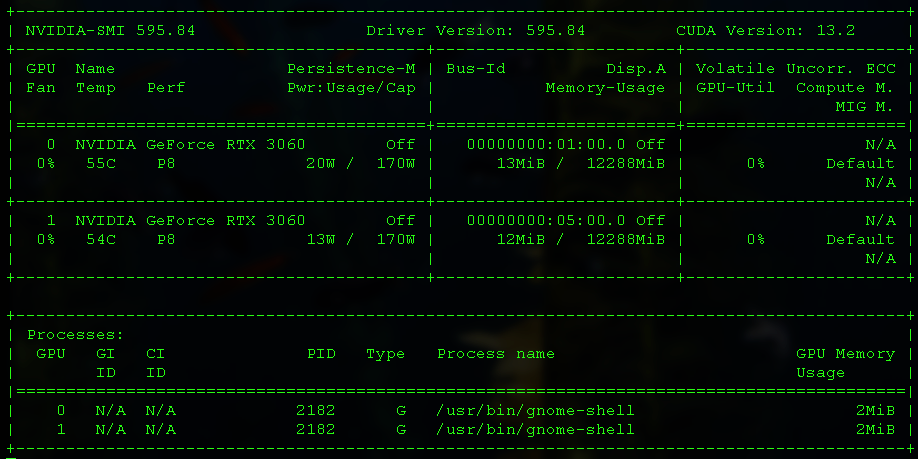
nvidia-smiIf this displays the GPU table, excellent -end of part two - next step - install ollama and openWebUI.
/*********************************END BEGIN************************************/
During my original build, nvidia-smi initially was not available even after the installing the correct driver. The old dusty gaming rig (whose name is "ToxBox") has some weird firmware issues which are way outside the scope of this guide - but I learned a lot from the following troubleshooting steps and commands and thought them worthy of including incase anyone else runs up against the same hinky things.
## Check the kernel side of the installation
Check whether NVIDIA or the open-source nouveau driver is loaded:
lsmod | grep -E 'nvidia|nouveau'Confirm the running kernel:
uname -rIf DKMS was involved, check its status:
dkms statusSee which NVIDIA packages are actually installed:
dpkg -l | grep -E 'nvidia-(driver|dkms|kernel|utils)'Confirm that the NVIDIA kernel module exists:
modinfo -F filename nvidiaAnd inspect its signing information:
modinfo -F signer nvidia
modinfo -F sig_hashalgo nvidia
## 5. Make the machine tell you why the module will not load
Instead of guessing, try loading the module manually:
sudo modprobe nvidiaThe useful failure from my build was:
modprobe: ERROR: could not insert 'nvidia': Key was rejected by serviceThat error suggested that the hardware was visible and the driver had been installed, but the kernel was refusing the module. The investigation moved from NVIDIA drivers to UEFI Secure Boot.
## 6. Check Secure Boot / UEFI
mokutil --sb-stateIf Secure Boot is enabled, the kernel requires loadable modules to be trusted. A locally built or otherwise untrusted module can therefore exist perfectly happily on disk and still be rejected when modprobe tries to insert it.
Useful checks if you are working through a signed-module problem:
mokutil --list-enrolled
modinfo -F signer nvidia
modinfo -F sig_hashalgo nvidia
In my original build, because ToxBox is a weirdo, I chose the pragmatic route for the playground: disable Secure Boot in UEFI, reboot, and confirm the driver loaded. I then rebooted the machine several times to make sure the fix was repeatable before moving on. as am edit - I have since re-enabled secure boot and loaded the driver and registered its cert.
## 7. After changing Secure Boot, test the driver again
lsmod | grep nvidia
nvidia-smi
At this point the expected result is that both RTX 3060s appear in the NVIDIA table, with the driver version, temperature, power state, memory usage, and other telemetry visible.
## 8. Final proof: watch both GPUs continuously
nvidia-smi --loop=2This refreshes nvidia-smi every two seconds. Let it run for a little while and verify that both cards remain visible. Press Ctrl+C to stop it.
We now have a clean stopping point for this stage of the build: Ubuntu can see both physical GPUs, the NVIDIA driver is installed, the kernel module loads, and NVIDIA's management interface can communicate with the cards.
## Where this leaves the playground
The GPUs are now healthy from Ubuntu's point of view. I deliberately stop here rather than immediately pulling Docker, the NVIDIA Container Toolkit, Ollama, and an LLM on top. When something fails later, this gives us a known-good baseline: the operating system itself can use the cards.
Next: getting a rootless ollama container to orchestrate local models access to the NVIDIA GPUs "without" undoing the security model we just set up.